

Yesterday, I ran out of tokens in OpenAI Codex while oxidizing parts of my Python codebase into Rust. It was around 11:30 PM, and I had to wait another two hours for the limits to reset.

That moment felt strangely familiar.
Just like how losing internet access can suddenly stop our work, AI tools are slowly becoming similar for engineers. Once you get used to coding agents helping with debugging, refactoring, and boilerplate code, suddenly not having access feels very surprisingly disruptive.

And honestly, I can already see many engineers ( including me 😀 ) becoming less willing to go back and write or fix everything completely by themselves again.
Since I had to wait for the usage limits to reset anyway, I decided to explore something I had been thinking about to test for a while, running a good local coding model directly on my Mac. But this time, I wanted to try a different inference stack.
Instead of the usual llama.cpp + GGUF setup, I wanted to experiment with Apple’s MLX ecosystem and choose Qwen Coder through an MLX server.
I have added the setup and installation guide later in this post, but before getting into that, I want to discuss one particularly interesting part of this model architecture that initially confused me while exploring local coding models on Apple Silicon.
“Qwen3-Coder 35B only activates ~3B parameters per token during inference.”
If the model is 35 billion parameters, how can only 3 billion be active? or What does “activates ~3B parameters per token” actually means?
The answer is that modern coding models like Qwen using a model architecture called Mixture of Experts (MoE).
Traditional Dense Models
Let’s take a simple coding prompt:
Write a Python function to sort a listIn a traditional dense model, every token in that prompt flows through the entire neural network. If the model is a dense 35B model for example, All 35B parameters participate for every token.
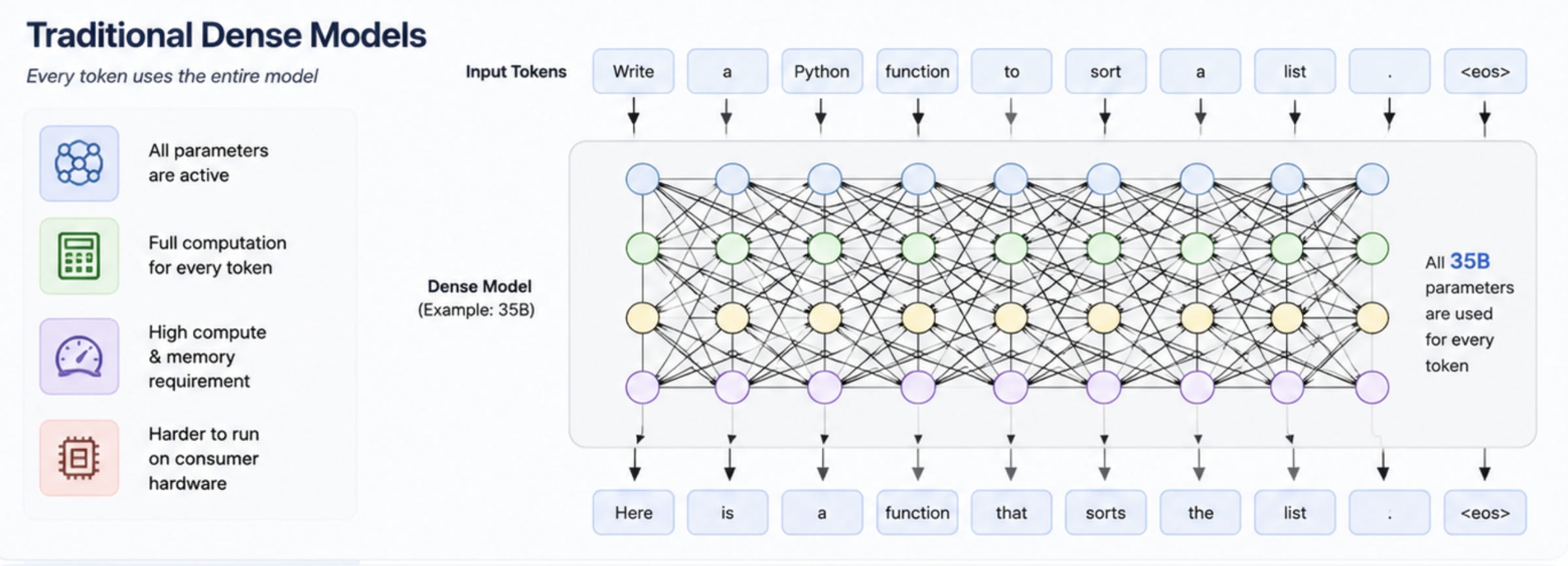
that means, every layer is active, every expert path is active and every token pays the full compute cost.
Because of this, large dense models typically require:
higher GPU compute
significantly more memory bandwidth
increased thermal and power consumption
slower local inference, since every token traverses the full network
This is also one reason why running large dense models on consumer hardware can become challenging. The architecture is extremely capable, but computationally expensive.
Mixture of Experts (MoE)
MoE models work differently.
Instead of one giant monolithic network, the model contains multiple specialised “experts”. for example at abstract level to think.
Model
 ├── Expert 1
 ├── Expert 2
 ├── Expert 3
 ├── ...
 └── Expert N
When a token arrives (part of your prompt), a small internal routing network decides:
Which experts are most useful for processing this token?
For example, if the prompt is related to Python code, the router may decide that coding-focused experts are sufficient. Instead of activating the entire model, only a subset of specialized experts become active during that token generation step. The full model still exists in memory, but only a smaller portion is actually performing compute work at that moment.
Python token
 → coding-focused experts

Math reasoning token
 → reasoning experts

Natural language token
 → language experts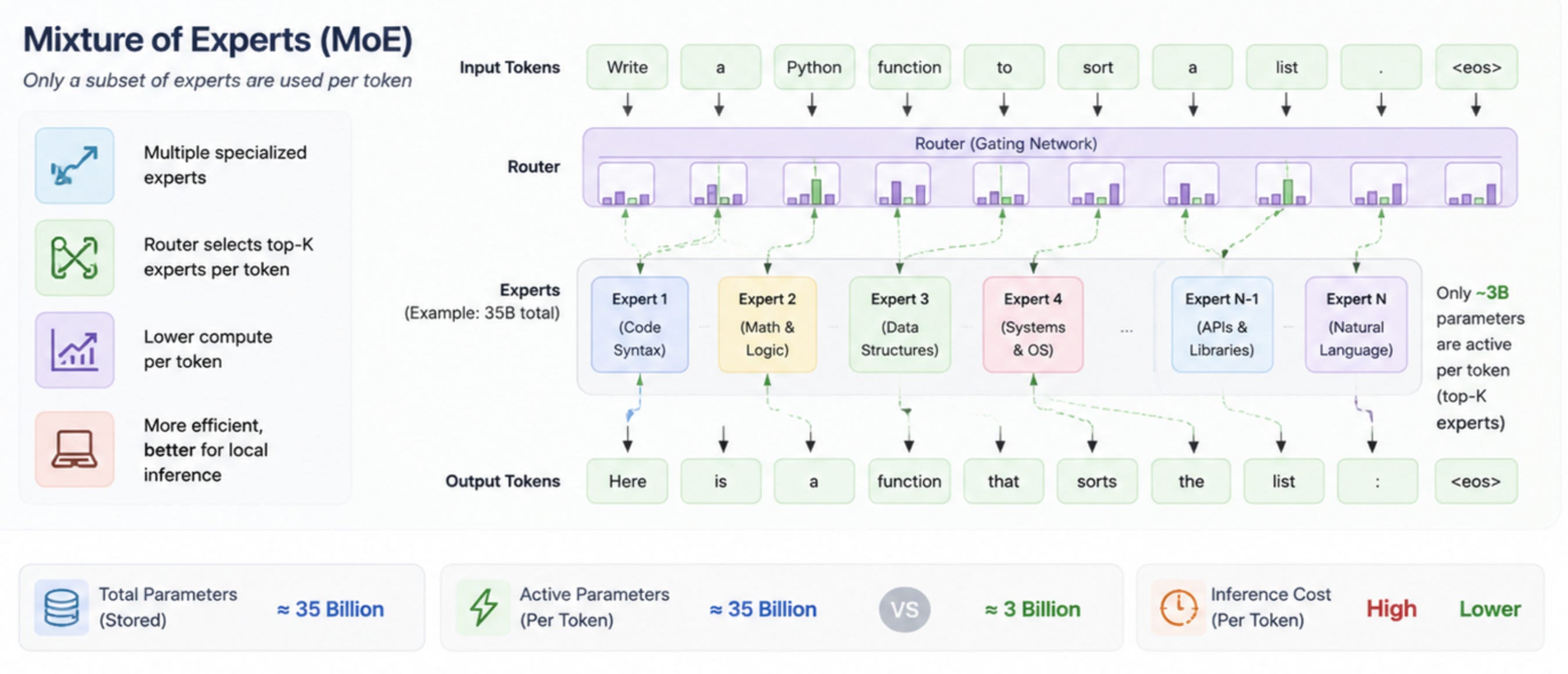
That is why a model describes
35B total parameters → ~3B active parameters
Why This Matters for Apple Silicon
M-series Mac + Apple MLX = 🚀⚡
The first part of the equation is the M-series Mac architecture itself.
Apple Silicon already has a major advantage for local AI workloads because of its unified memory architecture. Unlike traditional systems where CPU and GPU memory are separated, Apple Silicon allows both to access the same shared memory pool directly.
This makes running larger models far more practical on consumer devices, especially compared to GPUs constrained by fixed VRAM limits.
The second part of the equation is Apple MLX.
MLX is Apple’s machine learning framework built specifically for Apple Silicon. It is designed around:
Unified memory
Metal acceleration
efficient tensor operations
can run with less extra system cost while generating responses.
Instead of relying on CUDA-style GPU pipelines primarily optimized for NVIDIA hardware, MLX is closely aligned with how Apple Silicon operates internally.
This becomes especially powerful when combined with MoE models like Qwen Coder. The two complement each other extremely well:
MoE reduces the amount of active computation during inference.
MLX optimizes how that computation executes on Apple Silicon.
Running Qwen Coder with MLX Locally
After understanding how MoE models work internally, let’s actually test the setup on MacBook. Here is the command reference.
uv tool install mlx-lm

mlx_lm.server \
  --model mlx-community/Qwen3.5-35B-A3B-OptiQ-4bit \
  --port 8000
During the first run, MLX automatically downloads the model weights from Hugging Face locally onto the machine.
Once the download completes, the server initializes the model and exposes a local endpoint:
http://localhost:8000/v1Quick Test Using curl
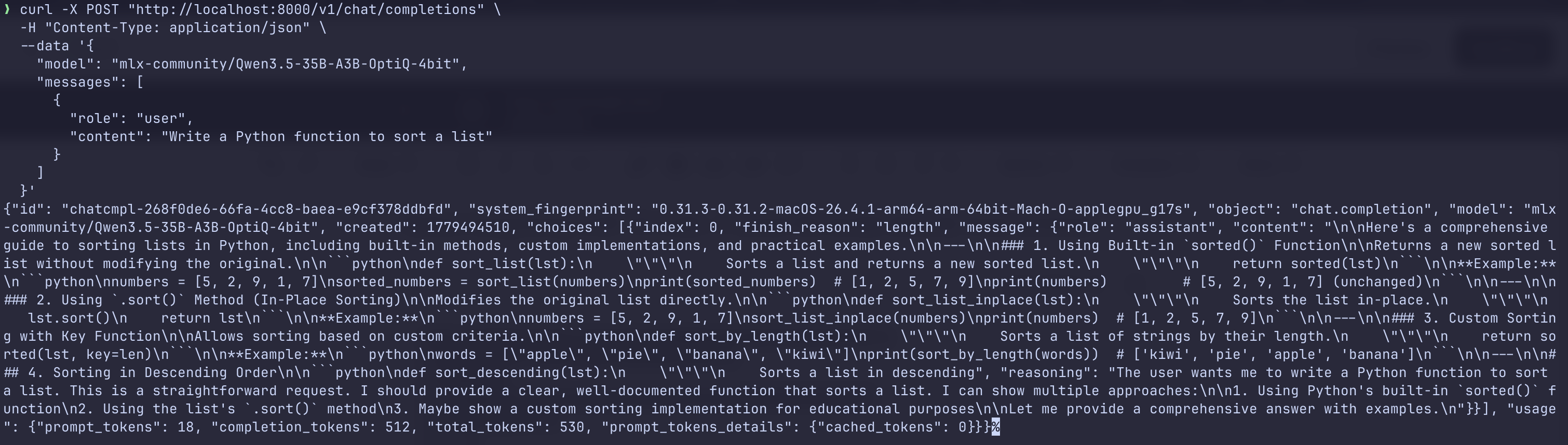
Before integrating with VS Code , I tested the model directly from terminal:
curl -X POST "http://localhost:8000/v1/chat/completions" \
  -H "Content-Type: application/json" \
  --data '{
    "model": "mlx-community/Qwen3.5-35B-A3B-OptiQ-4bit",
    "messages": [
      {
        "role": "user",
        "content": "Write a Python function to sort a list"
      }
    ]
  }'
At this point, the model was fully running locally on the Mac.
No cloud inference. 💙
No external API calls. 😊😊
Just local inference through MLX. 🚀🚀🚀
Connecting to VS Code
I then connected the local model to VS Code using Continue Extension.
After installing the Continue extension in VS Code, add the model configuration inside:
/Users/<your-user>/.continue/config.yamlname: Local Config
version: 1.0.0
schema: v1
models:
- name: Qwen MLX Local
provider: openai
model: mlx-community/Qwen3.5-35B-A3B-OptiQ-4bit
apiBase: http://localhost:8000/v1
apiKey: dummyNote : Although the model is running locally through MLX, the editor integration still works because the MLX server exposes an OpenAI-compatible API format.
Thank you for the post! I did try Qwen model locally in my mac and have to be honest I am enjoying the speed and performance. Just astonished by the mac shared memory and efficiency!!