
Artifacts – January ’26 Edition
Engineer's Placeholder, AI Notes, Industry Signals

Hello Engineers 👋🏽
Welcome to first month’s newsletter of this year 2026! ,
First of all thank you all for the great support ! and wish you wonderful happy new year !
Let’s dive in

Optimising Too Early
The One Engineering Habit I’m Trying to Unlearn
For a long time, I treated early optimisation as a sign of competence.
Cleaner abstractions. Designs built for the future. It felt responsible like getting ahead of problems before they existed. Lately, I’ve been trying to unlearn that instinct.
When I optimise too early, I often optimise the wrong thing. I make decisions before I know how the system will actually be used.
I’ve noticed a pattern across many side projects I’ve worked on, particularly those where I started with highly configurable frameworks.
The first bottleneck is rarely the one I expected.
The performance concern that felt urgent often wasn’t.
The part I over-engineered early is usually the part I later remove.
What early optimisation really buys me is psychological comfort.
It creates a feeling of control during an uncertain phase of a project.
But engineering progress rarely comes from control alone.It comes from feedback.
Right now, I’m trying to change how I approach early decisions.
I lean toward clear, boring implementations.
I care more about how easy something is to change than how clever it sounds.
I focus on adding instrumentation first because code agents can help me build fast, but only feedback tells me what actually matters.
For senior engineers building early-stage systems, this shift matters a lot.
Experience from large-scale problems is valuable but it can also push us to solve problems too early.
Early systems need room to evolve before they need to perform.
This doesn’t mean ignoring performance or scalability.
It means earning them with evidence.
Optimisation still matters but when you do it matters more.
And the hardest habit to unlearn isn’t technical.
It’s accepting that you don’t know the right problems at the start.

OpenClaw
OpenClaw.ai is an ambitious, open-source platform pushing the envelope on personal AI assistants shifting from reactive chatbots to autonomous agents that can perform tasks, automate workflows, and evolve over time.
OpenClaw can run locally on your own machine or private server. It isn’t just a chatbot, it can act:
Automate tasks like managing your calendar, inbox, and reminders.
Interact through apps you already use (e.g., WhatsApp, Telegram, Slack, Discord, Signal, iMessage).
Access files, run scripts, browse the web, and bridge external services via plugins or skills.
Maintain persistent memory, remembering user context and preferences over time.
It connects with your choice of AI models (OpenAI, Anthropic, or even local LMs) and integrates deeply with workflows and productivity tools.
AgentFS
AgentFS is a specialized filesystem designed to support AI agents safely and effectively. Its core idea is to provide AI agents with access to real tools (like CLI tools and binaries) and files in a way that protects your actual project files and environment.

Why It Matters
AI agents that can read, write, and execute code or scripts often need deep access to a system. But giving them unrestricted file access is risky. Agents can accidentally overwrite data, delete files, or behave unpredictably.
AgentFS solves this by sandboxing filesystem interactions while maintaining a complete audit trail of what the agent does.
Key Features
Isolation: Agents work in a copy-on-write sandbox so your original files stay intact.
Auditability: Every read/write operation is logged in a portable SQLite file you can inspect.
Portability: Agent sessions, including all file changes and state, are stored in one SQLite database file, making it easy to share or replay.
Snapshots & Forking: Instant snapshot and rollback capabilities let you test, experiment, and debug agents safely.
How It Works
Developers can run AI agents within the AgentFS sandbox through a CLI or integrate it via SDKs. The agent operates normally, but all filesystem activity happens within the isolated environment. You can then review and approve changes before committing them to your real filesystem.
Use Cases
Safe code generation and refactoring by coding agents (e.g., Claude Code).
Testing and debugging custom AI workflows with reproducible environments.
Browser-based agent environments with sandboxed file access.
Ask for the Opposing Design
When an AI gives you a solution, don’t stop there.
Ask it: “Give me the opposite approach and explain when it’s actually the better choice.”
An LLM doesn’t compute a single “correct” solution. Internally, it explores many possible continuations in a high-dimensional space of patterns it has learned from books, code, papers, and discussions.
When you ask a normal question, the model tends to follow the most statistically likely and socially reinforced path: the standard, popular, or safest design.
By explicitly asking for the opposite approach, you shift the model out of that default attractor. You’re forcing it to activate different regions of its learned knowledge: edge cases, minor patterns, contrarian blog posts, academic trade-off discussions, and failure reports. In effect, you are changing the search direction in its reasoning space.
Instead of receiving a single, linear answer, you get architectural thinking like pros, cons, constraints, and scenarios where a completely different design makes more sense.
It’s one of the better ways to use AI not just as a generator, but as a true engineering peer. someone that can challenge your assumptions, explore alternatives, and help you brainstorm like a second mind.
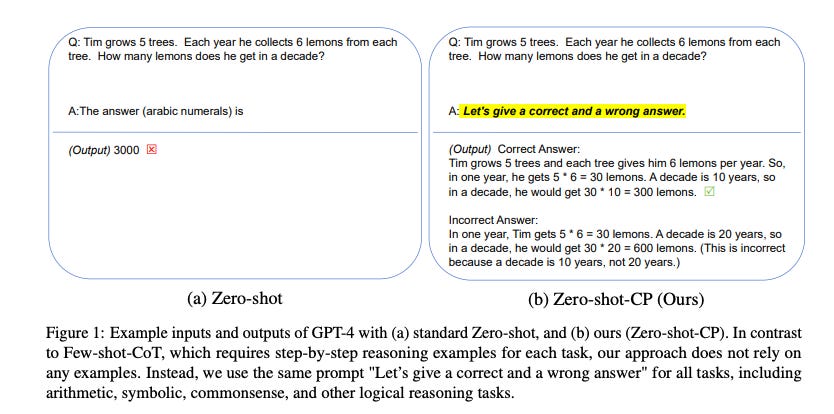
Contrastive Chain-of-Thought (CCoT) is an advanced prompting technique where the model is guided to reason over contrasting alternatives instead of a single path, helping it surface trade-offs, assumptions, and boundary conditions behind each approach.
ArXiv Paper “Large Language Models are Contrastive Reasoners” argues that explicit contrastive prompting significantly improves model reasoning by forcing the model to consider alternative answers and juxtapose them.

Google's Project Genie
Genie is an experimental AI world-building prototype that lets people create, explore, and remix interactive virtual worlds using simple text prompts and images.
It’s powered by DeepMind’s Genie 3 world model, a system designed to simulate dynamic environments in real time.
Users can design environments, define characters, and navigate through the generated worlds, with the AI generating the next part of the world as you move
World sketching: Describe a world with text or an image to generate an environment.
World exploration: Navigate through the generated world in first or third-person like walking, flying, driving with the AI creating what’s ahead as you go.
World remixing: Modify existing worlds or combine elements from other creations; you can even download videos of your explorations.
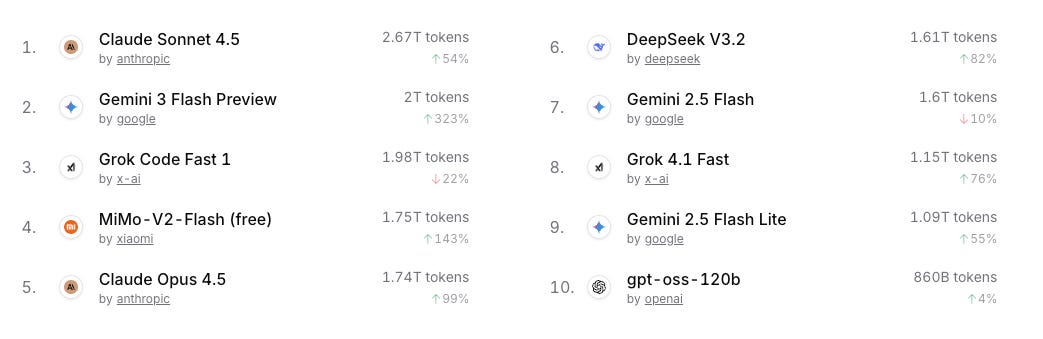
State of the LLMs: This Month’s Leaderboard
AI Trends 2026
Quantum, Agentic AI & Smarter Automation
📣 Recap
Sharing a few of my recent posts 📚 in case you missed them.


Thanks for reading! I’d love to hear your thoughts or feedback 🙂
KK